Hello Readers,
Trust you are doing well!!!
According to Oracle documentation, Autonomous Recovery Service (ARS) — a fully managed service built on Oracle’s on-premises Zero Data Loss Recovery Appliance (ZDLRA) technology — is the recommended solution for performing database backups. ARS provides modern cybersecurity protection and ensures reliable, low-risk recovery for Oracle Databases. Alternatively, you can also configure Automatic Backups for a database using Object Storage, which can be easily set up through the OCI Console.
While working with one of our customers recently, we came across a unique requirement — setting up traditional RMAN backups on private Object Storage buckets for a newly created DBCS instance. In this post, I’ll walk you through the entire process, share some of the challenges we faced, and explain how we resolved them, so you have a single go-to reference if you ever need to do the same.
To begin with, we need to complete all the required prerequisites for this configuration:
Networking requirement:
Virtual Cloud Network (VCN) associated with DBCS has to be enabled with following access:
- A service gateway – In object storage bucket is in same region as that of DBCS.
- A Internet gateway – In object storage bucket is in different region as that of DBCS.
Storage requirement:
- Object storage bucket (You can use existing one or create new for backups). Follow the steps given in this link to create new bucket
- OS directory to manage required wallet, config & library files.
IAM access requirement:
- OCI user to manage bucket & install backup module.
- Required IAM policy for user group to access object bucket. Required policies are as given below:
- Allow group <group_name> to manage objects in compartment <> where target.bucket.name = ‘<bucket_name>’
- Allow group <group_name> to read buckets in compartment <compartment_name>
- An auth token generated by OCI. Follow the steps given in this link to generate token
After completing the prerequisites, it’s time to install the backup module. Below is the sample command for the same.
java -jar opc_install.jar \
-opcId <user_id> \
-opcPass '<auth_token>' \
-container <bucket_name> \
-walletDir ~/wallet/ \
-libDir ~/lib/ \
-configfile ~/config \
-host https://swiftobjectstorage.<region_name>.oraclecloud.com/v1/<object_storage_namespace>
Steps to install backup module:
- Start by taking an SSH session to one of the database nodes using the opc user.
- Next, switch to the oracle user and navigate to the following directory:
- /opt/oracle/oak/pkgrepos/oss/odbcs
- Check if the file opc_installer.jar exists in this location. In my case, the file was present but had a size of 0 KB — which led to the “Error: Invalid or corrupt jarfile opc_installer.jar” when attempting to install the backup module.

To resolve this you have one of below options:
Option 1:

You may need to download the new jar file from this link .

Option 2:

Update jar by running "dbcli update-server -c oss" using root user. Follow MOS note: DBCS: VMBM - Installing Cloud Backup Module Fails With Error: javax/xml/bind/DatatypeConverter (Doc ID 3002150.1)

Option 3:

The file can be copied from another functioning cluster.
The first two options didn’t work for me; the installation failed each time with the error below. I resolved it by copying the file from a server that already had automatic backups set up.
Oracle Database Cloud Backup Module Install Tool, build 19.3.0.0.0DBBKPCSBP_2019-10-16
Exception in thread “main” java.lang.NoClassDefFoundError: javax/xml/bind/DatatypeConverter
at oracle.backup.util.FileDownload.encode(FileDownload.java:803)
at oracle.backup.util.FileDownload.addBmcAuthHeader(FileDownload.java:642)
at oracle.backup.util.FileDownload.addHttpAuthHeader(FileDownload.java:164)
at oracle.backup.util.FileDownload.addHttpAuthHeader(FileDownload.java:146)
at oracle.backup.opc.install.BmcConfig.initBmcConnection(BmcConfig.java:397)
at oracle.backup.opc.install.BmcConfig.initBmcConnection(BmcConfig.java:388)
at oracle.backup.opc.install.BmcConfig.testConnection(BmcConfig.java:353)
at oracle.backup.opc.install.BmcConfig.doBmcConfig(BmcConfig.java:227)
at oracle.backup.opc.install.BmcConfig.main(BmcConfig.java:219)
Caused by: java.lang.ClassNotFoundException: javax.xml.bind.DatatypeConverter
at java.base/jdk.internal.loader.BuiltinClassLoader.loadClass(BuiltinClassLoader.java:581)
at java.base/jdk.internal.loader.ClassLoaders$AppClassLoader.loadClass(ClassLoaders.java:178)
at java.base/java.lang.ClassLoader.loadClass(ClassLoader.java:526)
Then I tried installing backup module again, this time it failed with different error:

This time, I tried tracing the issue to see if the DBCS host could access the Object Storage bucket using a curl command — but it failed with the same error:
curl -v -X GET https://swiftobjectstorage.<region_name>.oraclecloud.com/v1/<object_storage_namespace> -u <opcId>:<opcPass>
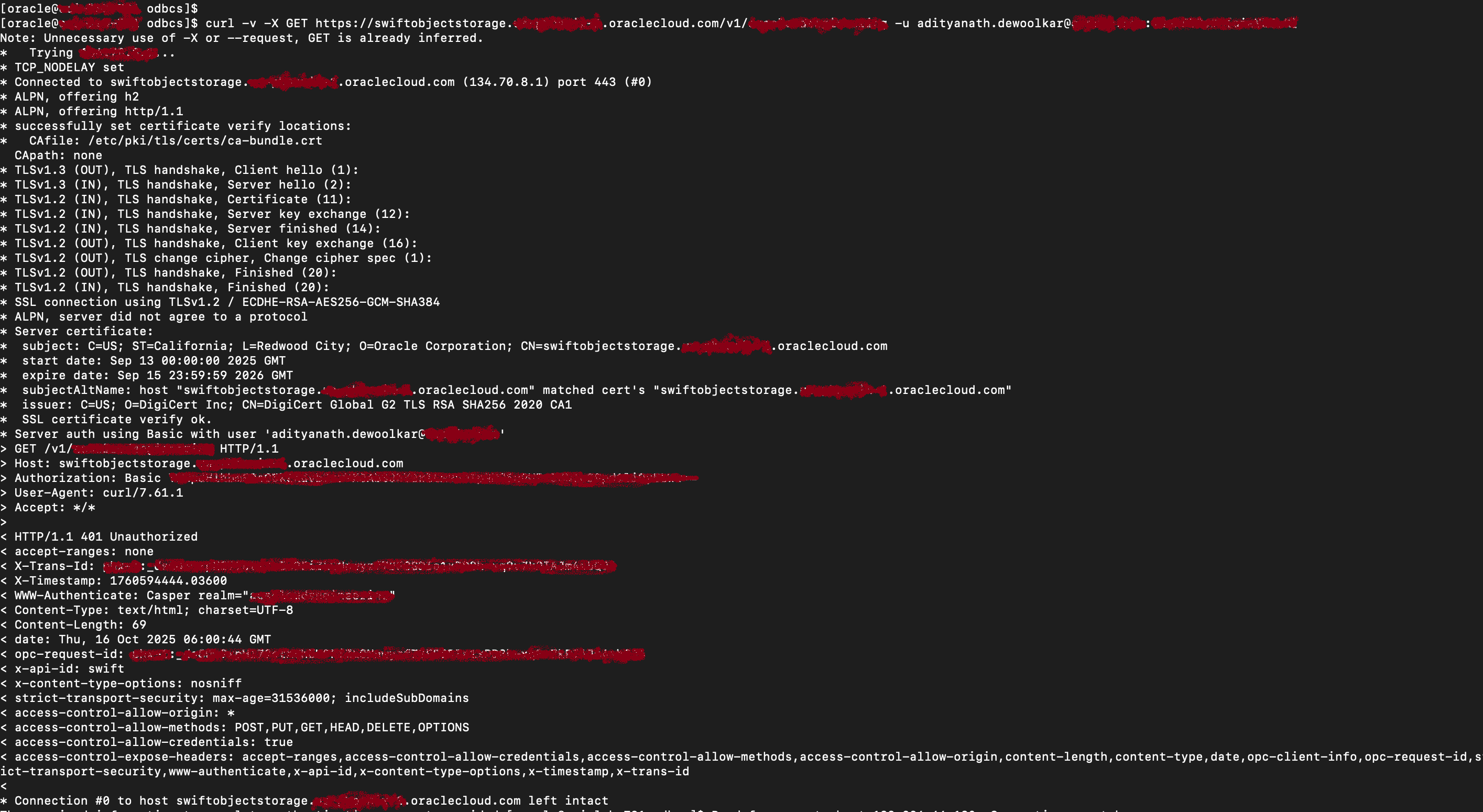
Based on MOS document: Installing the Backup Module Fails Due to Specifying Insufficient OpcId (Doc ID 2524198.1)
The user id which was specified for opcId was actually IDCS federated user. In such case opcId needs to be specified including the prefix oracleidentitycloudservice/ , then the authentication should be successful.
So my command looked like given below:
java -jar opc_install.jar \
-host  https://swiftobjectstorage.<REGION NAME>.oraclecloud.com/v1/<NAMESPACE> \
-opcId 'OracleIdentityCloudService/<OCI USER NAME>' \
-opcPass '<TOKEN>' \
-container <BUCKET NAME> \
-walletDir <WALLET DIR> \
-libDir <LIB DIR> \
-configfile <CONFIG FILE WITH FULL PATH>
This time, I was finally able to install the backup module! 🙂

Now, let’s move on to completing the RMAN configuration and testing the backup manually.
RMAN configuration steps:
CONFIGURE CHANNEL DEVICE TYPE 'SBT_TAPE' PARMS 'SBT_LIBRARY=/libopc.so, SBT_PARMS=(OPC_PFILE=)';
CONFIGURE DEFAULT DEVICE TYPE TO SBT_TAPE;
CONFIGURE BACKUP OPTIMIZATION ON;
CONFIGURE CONTROLFILE AUTOBACKUP ON;
CONFIGURE CONTROLFILE AUTOBACKUP FORMAT FOR DEVICE TYPE SBT_TAPE TO '%F';
CONFIGURE ENCRYPTION FOR DATABASE ON;
Now you take RMAN backup as per your requirement.
I took full RMAN backup & can see it completed on Oracle dictionary view.

I also see required backup piece in object storage bucket via OCI console.

Hope you will find this post very useful!!
Let me know for any questions and any further information in comments or LinkedIn.


 Adityanath's Database & Cloud Blog
Leave a comment