Few days back, I was applying OPatch on one of the database residing on windows server. I tried it multiple times without any luck as everytime when I tried applying patch, I was getting below error:
OUI-67073:UtilSession failed: Prerequisite check “CheckActiveFilesAndExecutables” failed.
This was due to some of the DLL files related to oracle on server were used by some of the active processes even after I had stopped all oracle related services. Even i tried rebooting whole server, but it didn’t help.
I did check related logfile so as to get more details about the error:
[Oct 6, 2016 6:20:18 PM] Prereq checkPatchApplicableOnCurrentPlatform Passed for patch : 23530402
[Oct 6, 2016 6:20:18 PM] Following files are active :
 G:\OPENPA~1\REPOSI~1\SERVER~2\software\database\bin\oracell11.dll
 G:\OPENPA~1\REPOSI~1\SERVER~2\software\database\bin\oraasmclnt11.dll
 G:\OPENPA~1\REPOSI~1\SERVER~2\software\database\bin\orapls11.dll
 G:\OPENPA~1\REPOSI~1\SERVER~2\software\database\bin\orageneric11.dll
 G:\OPENPA~1\REPOSI~1\SERVER~2\software\database\bin\oraclient11.dll
 G:\OPENPA~1\REPOSI~1\SERVER~2\software\database\bin\oracommon11.dll
 G:\OPENPA~1\REPOSI~1\SERVER~2\software\database\bin\oraplp11.dll
 G:\OPENPA~1\REPOSI~1\SERVER~2\software\database\bin\oraxml11.dll
 G:\OPENPA~1\REPOSI~1\SERVER~2\software\database\bin\orannzsbb11.dll
 G:\OPENPA~1\REPOSI~1\SERVER~2\software\database\bin\orazt11.dll
 G:\OPENPA~1\REPOSI~1\SERVER~2\software\database\bin\oraztkg11.dll
 G:\OPENPA~1\REPOSI~1\SERVER~2\software\database\bin\oran11.dll
 G:\OPENPA~1\REPOSI~1\SERVER~2\software\database\bin\orantcp11.dll
 G:\OPENPA~1\REPOSI~1\SERVER~2\software\database\bin\oranl11.dll
 G:\OPENPA~1\REPOSI~1\SERVER~2\software\database\bin\orancrypt11.dll
 G:\OPENPA~1\REPOSI~1\SERVER~2\software\database\bin\orahasgen11.dll
 G:\OPENPA~1\REPOSI~1\SERVER~2\software\database\bin\oraocr11.dll
 G:\OPENPA~1\REPOSI~1\SERVER~2\software\database\bin\oraocrb11.dll
 G:\OPENPA~1\REPOSI~1\SERVER~2\software\database\bin\oraocrutl11.dll
[Oct 6, 2016 6:20:18 PM] Prerequisite check "CheckActiveFilesAndExecutables" failed.
 The details are:
 Following files are active :
 G:\OPENPA~1\REPOSI~1\SERVER~2\software\database\bin\oracell11.dll
 G:\OPENPA~1\REPOSI~1\SERVER~2\software\database\bin\oraasmclnt11.dll
 G:\OPENPA~1\REPOSI~1\SERVER~2\software\database\bin\orapls11.dll
 G:\OPENPA~1\REPOSI~1\SERVER~2\software\database\bin\orageneric11.dll
 G:\OPENPA~1\REPOSI~1\SERVER~2\software\database\bin\oraclient11.dll
 G:\OPENPA~1\REPOSI~1\SERVER~2\software\database\bin\oracommon11.dll
 G:\OPENPA~1\REPOSI~1\SERVER~2\software\database\bin\oraplp11.dll
 G:\OPENPA~1\REPOSI~1\SERVER~2\software\database\bin\oraxml11.dll
 G:\OPENPA~1\REPOSI~1\SERVER~2\software\database\bin\orannzsbb11.dll
 G:\OPENPA~1\REPOSI~1\SERVER~2\software\database\bin\orazt11.dll
 G:\OPENPA~1\REPOSI~1\SERVER~2\software\database\bin\oraztkg11.dll
 G:\OPENPA~1\REPOSI~1\SERVER~2\software\database\bin\oran11.dll
 G:\OPENPA~1\REPOSI~1\SERVER~2\software\database\bin\orantcp11.dll
 G:\OPENPA~1\REPOSI~1\SERVER~2\software\database\bin\oranl11.dll
 G:\OPENPA~1\REPOSI~1\SERVER~2\software\database\bin\orancrypt11.dll
 G:\OPENPA~1\REPOSI~1\SERVER~2\software\database\bin\orahasgen11.dll
 G:\OPENPA~1\REPOSI~1\SERVER~2\software\database\bin\oraocr11.dll
 G:\OPENPA~1\REPOSI~1\SERVER~2\software\database\bin\oraocrb11.dll
 G:\OPENPA~1\REPOSI~1\SERVER~2\software\database\bin\oraocrutl11.dll
[Oct 6, 2016 6:20:18 PM] OUI-67073:UtilSession failed: Prerequisite check "CheckActiveFilesAndExecutables" failed.
[Oct 6, 2016 6:20:18 PM] Finishing UtilSession at Thu Oct 06 18:20:18 CAT 2016
[Oct 6, 2016 6:20:18 PM] Log file location: G:\OPENPA~1\REPOSI~1\SERVER~2\software\database\cfgtoollogs\opatch\opatch2016-10-06_18-20-12PM_1.log
[Oct 6, 2016 6:20:18 PM] Stack Description: java.lang.RuntimeException: Prerequisite check "CheckActiveFilesAndExecutables" failed.
[Oct 6, 2016 6:20:18 PM] StackTrace: oracle.opatch.OPatchSessionHelper.runApplyPrereqs(OPatchSessionHelper.java:5765)
[Oct 6, 2016 6:20:18 PM] StackTrace: oracle.opatch.opatchutil.NApply.legacy_process(NApply.java:905)
[Oct 6, 2016 6:20:18 PM] StackTrace: oracle.opatch.opatchutil.NApply.legacy_process(NApply.java:367)
[Oct 6, 2016 6:20:18 PM] StackTrace: oracle.opatch.opatchutil.NApply.process(NApply.java:362)
[Oct 6, 2016 6:20:18 PM] StackTrace: oracle.opatch.opatchutil.OUSession.napply(OUSession.java:1084)
[Oct 6, 2016 6:20:18 PM] StackTrace: sun.reflect.NativeMethodAccessorImpl.invoke0(Native Method)
[Oct 6, 2016 6:20:18 PM] StackTrace: sun.reflect.NativeMethodAccessorImpl.invoke(NativeMethodAccessorImpl.java:39)
[Oct 6, 2016 6:20:18 PM] StackTrace: sun.reflect.DelegatingMethodAccessorImpl.invoke(DelegatingMethodAccessorImpl.java:25)
[Oct 6, 2016 6:20:18 PM] StackTrace: java.lang.reflect.Method.invoke(Method.java:597)
[Oct 6, 2016 6:20:18 PM] StackTrace: oracle.opatch.UtilSession.process(UtilSession.java:358)
[Oct 6, 2016 6:20:18 PM] StackTrace: oracle.opatch.OPatchSession.process(OPatchSession.java:2515)
[Oct 6, 2016 6:20:18 PM] StackTrace: oracle.opatch.OPatch.process(OPatch.java:796)
[Oct 6, 2016 6:20:18 PM] StackTrace: oracle.opatch.OPatch.main(OPatch.java:846)
Such errors are very easy to fix on UNIX platform wherein we do have commands like ps, fuser or lsof to get details about the process accessing particular file. But what we can do for Windows platform.
I did check with widows admins to help me out here for identifying active processes. He told me about very intersting command “tasklist”.
Syntax: tasklist.exe /m <filename>
This command will give you details such as process name, PID & filename used by process as shown below:

So here I got the culprit. Now how to get rid of these processes. You can go to resource monitor under task manager to identify the process and then kill it as shown below:
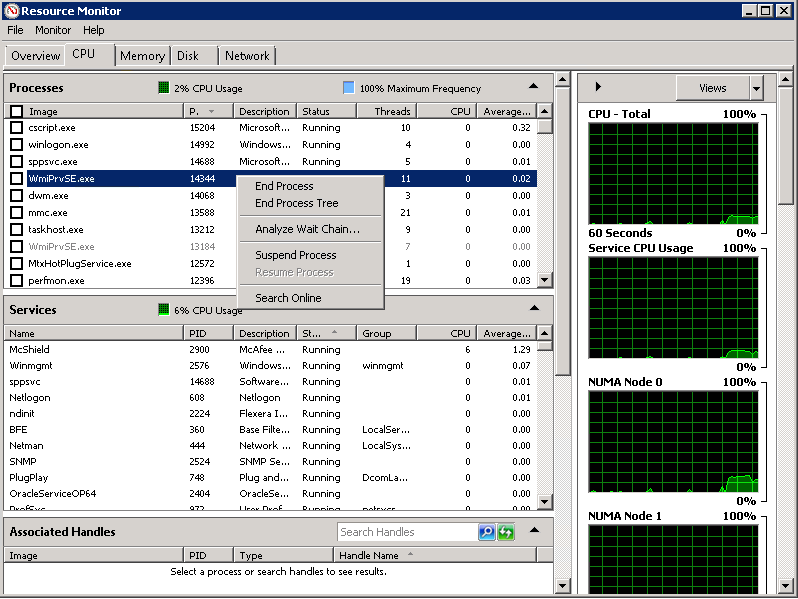
Now you can apply patch without any issues.
As per my past experience, killing windows process manually can cause some serious issues after some time. So after killing any process manually on windows server, will recommend you to cleanly restart your server.
Hope so u will find this post very useful:-)
Cheers
Regards,
Adityanath


 Adityanath's Database & Cloud Blog
Leave a reply to Ernestine Cancel reply