Dear Readers,
Recently I was working on one of the projects wherein a requirement was to compare two DB schemas (Both structure and data) & synchronize it. Requirement was as follows:
- Current application version is 1.0. It is using schema S_APPS in Oracle database as a backend.
- New upgrade pack was given by vendor for an application version 1.1. This unbundled into schema S_APPS_NEW.
- Once application is upgraded to 1.1, we need to compare two schemas S_APPS & S_APPS_NEW. & S_APPS has to be synchronized with S_APPS_NEW for all structural changes & data changes.
When I googled bit about it, I found a very effecient & lightweight tool called DEVART’s dbForge. More details can be found on below link:
I just installed trial version for the same to work on test database & I found its really helpful for completing my assignment. This is licensed tool & you can connect with DEVART for pricing details.
PFB Small demo for this tool usage:
Schema comparison:
This section will cover identifying & applying structural changes in two schemas. Start application named “dbForge Schema Compare for Oracle”.
Start Page:

Click on New Schema Comparison:

Specify Source & target schema correctly as given below. I am comparing S_APPS_NEW with S_APPS & Click on compare button:

Now below screen shows schema comparison report. Like object only present in S_APPS_NEW that’s needs to be created. Different object between two schema that needs alteration & Additional object present in target which needs to be dropped:

Now as per requirement I need to only apply changes from schema S_APPS_NEW to S_APPS. So I unchecked ‘DROP’ section as given below. See RED box:

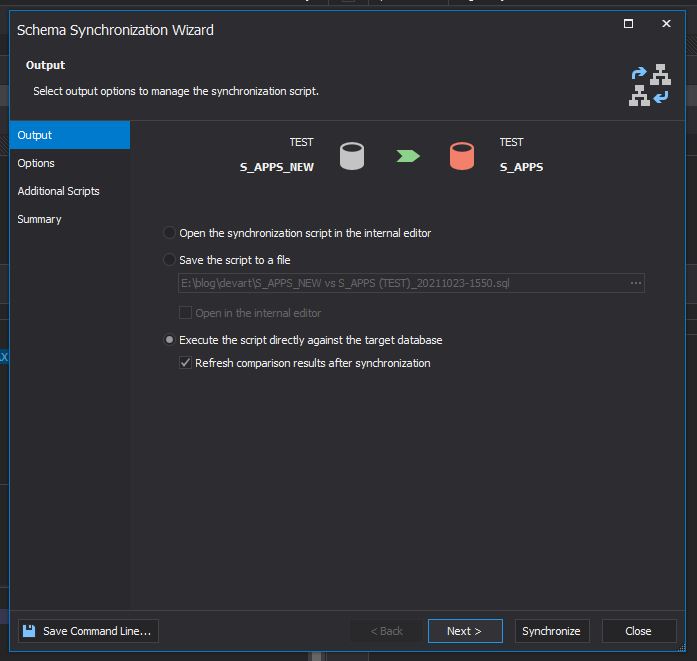
Now you can use synchronize using below option, which gives 3 options.
- Opening synchronization script on editor.
- Saving synchronization script as SQL file.
- Running synchronization against target schema.

I would strongly recommend using 1st or 2nd option, review it, then only go ahead with option 3.
Once I am happy with review of step 2. I can now use third option to actually run it.
Now I can see schema objects are in sync with one additional table in target schema.

Data comparison:
Once schema structures are in sync. We can go ahead with DATA sync. This section will cover identifying & applying DATA changes in two schemas. Start application named “dbForge Data Compare for Oracle”.
Start page:

Click on New Data Comparison. Specify Source & target schema correctly as given below. I am comparing S_APPS_NEW with S_APPS & Click on compare button:

You can use synchronization using 3 options, same as that of schema comparison.
- Opening synchronization script on editor
- Saving synchronization script as SQL file
- Running synchronization against target schema.

I would strongly recommend using 1st or 2nd option, review it, then only go ahead with option 3.
Once using option 3, I can data is synced between 2 schemas.

Hope u will find this post very useful.
Cheers
Regards,
Adityanath


 Adityanath's Database & Cloud Blog
Leave a comment