This post will provide u steps to deploy Oracle E-Business Suite plug-in into ORACLE OEM 12C which is also known as Oracle Application Management Pack for Oracle E-Business Suite.

The Oracle Application Management Pack for Oracle E-Business Suite extends Oracle Enterprise Manager 12c Cloud Control to help monitor and manage Oracle E-Business Suite systems more effectively. The pack integrates Oracle Applications Manager with Cloud Control to provide a consolidated, end-to-end Oracle E-Business Suite management solution. The pack can be used to manage both Oracle E-Business Suite Release 11i systems and Release 12 systems.

Before proceeding with deployment u first need to download “Oracle Application Management Suite for Oracle E-Business Suite 12.1.0.3.0” from https://edelivery.oracle.com. This will be a zip file named :V46070-01.zip & with size 433MB.

Now u r ready for OAM suite deployment:


oracle@rmb-zdr-oem01:$export EMCLI_STATE_DIR=/export/home/oracle/plugins
oracle@rmb-zdr-oem01:$export PATH=$PATH:$EMCLI_STATE_DIR
oracle@rmb-zdr-oem01:$ /u01/oracle/12C/middleware/oms/bin/emcli setup -dir=$EMCLI_STATE_DIR -url=https://oracle@rmb-zdr-oem01:7799 -user=sysman
Oracle Enterprise Manager 12c Release 4.
Copyright (c) 1996, 2014 Oracle Corporation and/or its affiliates. All rights reserved.
The configuration directory "/export/home/oracle/plugins" may not be local. See the "dir" option in the help for the setup command.
Do you want to continue using this directory? [yes/no] yes
Enter password:

This process should successfully complete giving status : Emcli setup successful.

Extract V46070-01.zip which will give u this file : ~/software/EBS-PlugIn/12.1.0.3.0/12.1.0.3.0_oracle.apps.ebs_2000_0.opar. Now update this plugin into OEM.


oracle@zbx-oem01:$ /u01/oracle/12C/middleware/oms/bin/emcli import_update -file="/export/home/oracle/plugins/software/EBS-PlugIn/12.1.0.3.0/12.1.0.3.0_oracle.apps.ebs_2000_0.opar" -omslocal
Processing update: Plug-in - Enterprise Manager for Oracle E-Business Suite consists of System Management and Change Management Feature Sets
Successfully uploaded the update to Enterprise Manager. Use the Self Update Console to manage this update.

Now U need to use OEM/OMS console to deploy plugin. PFB screenshots for the same: Go to Setup => Extensibility => Plug-ins:

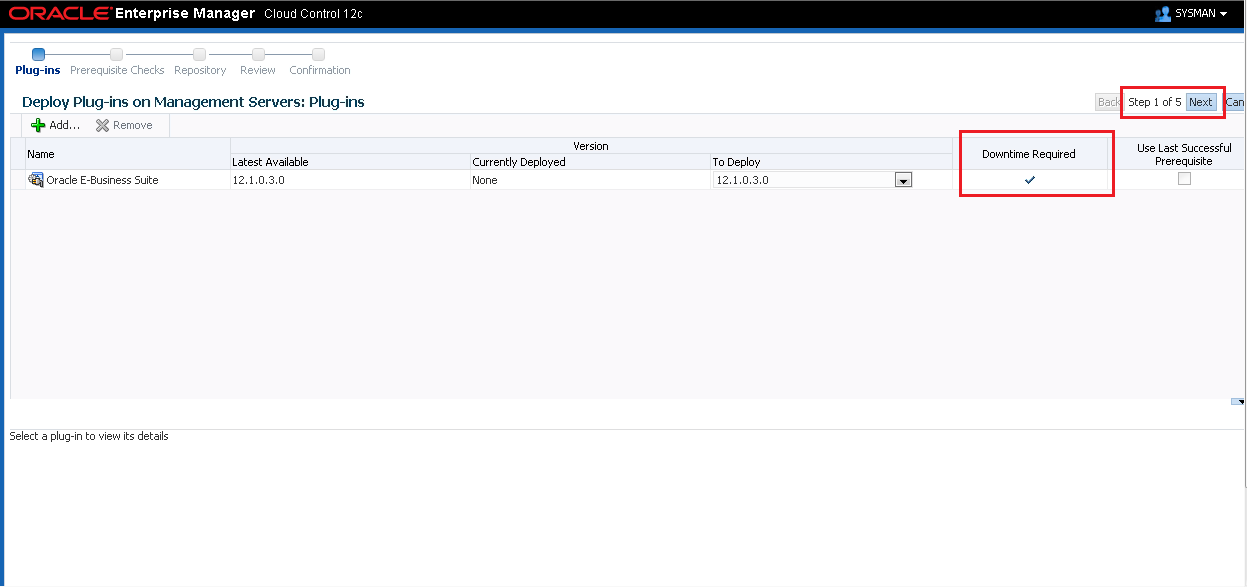
ebiz pluggin


ebiz pluggin

ebiz pluggin2

ebiz pluggin3

ebiz pluggin4

ebiz pluggin5

ebiz pluggin7

After this U need to monitor progress using command : emctl status oms -details:

Once everything is back up & running, U can log out and login to OEM console to have deployed Oracle E-Business Suite plug-in 🙂

ebiz plugin screenshots status

ebiz pluggin9

ebiz pluggin10

Hope so u will find this post very useful 🙂

Cheers

Regards,

Adityanath

Advertisements

24 responses to “Deploying Oracle E-Business Suite plug-in or Oracle Application Management Pack into ORACLE OEM 12C”

  1. manohar koli Avatar

    very nics adi…its realy hlpfulll…

    1. Adityanath Dewoolkar Avatar

      Thanks for visiting and appreciate your feedback. 🙂

  2. David Avatar
    David

    does the plugin only need to be deployed to the OMS or does it need to be deployed to the target agent also? Gracias!

    1. Adityanath Dewoolkar Avatar

      Hi David,

      We need to install plugin on agent host too!!

      Please refer following MOS Note : Step by Step to Install New AMP Plugin – Oracle E-Business Suite Plug-in 12.1.0.1.0 on top of Grid Control 12c (Doc ID 1463040.1)

      Hope this will help u!!

      Regards,
      Adi

  3. Moussa Avatar
    Moussa

    Thank you Adi, you saved my day 🙂
    Very useful post.

    Regards from Paris

    1. Adityanath Dewoolkar Avatar

      Thanks for visiting and appreciate your feedback. 🙂

  4. Prasad Avatar
    Prasad

    Hi Adityanath,

    This is very nice. Infact it helped a lot.

    Can you please share how to proceed further inorder to manage the EBS targets
    for eg: In the Oracle E-Business Management Screen it there is +Add to add the instance..

    Can you please share the steps that should be done after deploying plugin..

    Thanks,
    Prasad

    1. Adityanath Dewoolkar Avatar

      Hey Prasad,

      Thanks for visiting and appreciate your feedback. 🙂

      Can you please refer following MOS Notes :

      Step by Step to Install New AMP Plugin – Oracle E-Business Suite Plug-in 12.1.0.1.0 on top of Grid Control 12c (Doc ID 1463040.1)
      Getting Started with the Application Management Pack for Oracle E-Business Suite (Releases 2.0.0-2.0.2) (Doc ID 394448.1)

      Regards,
      Adi

  5. jpaugustin Avatar

    Thank you Adityanath. Very clear and concise. Could not find anything like it anywhere else done so nicely.

    1. Adityanath Dewoolkar Avatar

      Hello There,

      Thanks for visiting and appreciate your feedback.:-)

      Regards,
      Adi

  6. Lakeesha Pacana Avatar
    Lakeesha Pacana

    I consider something truly interesting about your weblog so I saved to fav.

    1. Adityanath Dewoolkar Avatar

      Hello There,

      Thanks for visiting and appreciate your feedback.:-)

      Regards,
      Adi

  7.  Avatar
    Anonymous

    Excellent website. A lot of useful info here. I’m sending it to a few
    friends ans also sharing in delicious. And obviously,
    thanks on your sweat!

  8. ปั้มไลค์ Avatar
    ปั้มไลค์

    Like!! I blog quite often and I genuinely thank you for your information. The article has truly peaked my interest.

  9. Christopher Avatar
    Christopher

    I have read so many articles or reviews about the
    blogger lovers however this paragraph is in fact a fastidious article, keep it up.

  10. Elizabeth Cummer Avatar
    Elizabeth Cummer

    Right here is the perfect blog for anybody who wishes to find out about this topic. You understand so much its almost tough to argue with you (not that I really will need to…HaHa). You certainly put a new spin on a subject that’s been written about for decades. Wonderful stuff, just excellent!

  11. Felipe Mustafaa Avatar
    Felipe Mustafaa

    Woah! I’m really digging the template/theme of this blog. It’s simple, yet effective. A lot of times it’s challenging to get that “perfect balance” between superb usability and visual appearance. I must say you’ve done a awesome job with this. Also, the blog loads super fast for me on Opera. Exceptional Blog!

  12. Rolf Manville Avatar
    Rolf Manville

    I enjoy your work, thankyou for all the interesting posts.

  13. Margot Avatar
    Margot

    My brother suggested I might like this blog. He was totally right.

    This post actually made my day. You cann’t imagine simply how much time I had spent for this information! Thanks!

  14. Hairstyles Avatar
    Hairstyles

    It抯 exhausting to search out knowledgeable people on this matter, however you sound like you understand what you抮e speaking about! Thanks

  15. what ps4 games Avatar
    what ps4 games

    Appreciating the time and effort you put into your site and
    in depth information you offer. It’s awesome to
    come across a blog every once in a while that isn’t the same outdated rehashed information. Great read!

    I’ve bookmarked your site and I’m adding your RSS feeds to my Google account.

  16. Reed Avatar
    Reed

    After going over a handful of the blog articles on your website, I truly appreciate your
    way of writing a blog. I book-marked it to my bookmark
    website list and will be checking back soon. Please check
    out my web site as well and let me know your opinion.

  17. Nicki Avatar
    Nicki

    Hello there, You have done an incredible job.

    I will certainly digg it and personally recommend to my friends.
    I am confident they will be benefited from this website.

  18. Beauty Fashion Avatar

    Hey very cool blog!! Man .. Excellent .. Amazing .. I will bookmark your I’m happy to find numerous useful info here in the post, we need develop more strategies in this regard, thanks for sharing. . . . . .

Leave a reply to Anonymous Cancel reply

Advertisements
Blog Stats

562,692 hits

Advertisements
Advertisements