This post will provide u steps to deploy Oracle E-Business Suite plug-in into ORACLE OEM 12C which is also known as Oracle Application Management Pack for Oracle E-Business Suite.
The Oracle Application Management Pack for Oracle E-Business Suite extends Oracle Enterprise Manager 12c Cloud Control to help monitor and manage Oracle E-Business Suite systems more effectively. The pack integrates Oracle Applications Manager with Cloud Control to provide a consolidated, end-to-end Oracle E-Business Suite management solution. The pack can be used to manage both Oracle E-Business Suite Release 11i systems and Release 12 systems.
Before proceeding with deployment u first need to download “Oracle Application Management Suite for Oracle E-Business Suite 12.1.0.3.0” from https://edelivery.oracle.com. This will be a zip file named :V46070-01.zip & with size 433MB.
Now u r ready for OAM suite deployment:
oracle@rmb-zdr-oem01:$export EMCLI_STATE_DIR=/export/home/oracle/plugins
oracle@rmb-zdr-oem01:$export PATH=$PATH:$EMCLI_STATE_DIR
oracle@rmb-zdr-oem01:$ /u01/oracle/12C/middleware/oms/bin/emcli setup -dir=$EMCLI_STATE_DIR -url=https://oracle@rmb-zdr-oem01:7799 -user=sysman
Oracle Enterprise Manager 12c Release 4.
Copyright (c) 1996, 2014 Oracle Corporation and/or its affiliates. All rights reserved.
The configuration directory "/export/home/oracle/plugins" may not be local. See the "dir" option in the help for the setup command.
Do you want to continue using this directory? [yes/no] yes
Enter password:
This process should successfully complete giving status : Emcli setup successful.
Extract V46070-01.zip which will give u this file : ~/software/EBS-PlugIn/12.1.0.3.0/12.1.0.3.0_oracle.apps.ebs_2000_0.opar. Now update this plugin into OEM.
oracle@zbx-oem01:$ /u01/oracle/12C/middleware/oms/bin/emcli import_update -file="/export/home/oracle/plugins/software/EBS-PlugIn/12.1.0.3.0/12.1.0.3.0_oracle.apps.ebs_2000_0.opar" -omslocal
Processing update: Plug-in - Enterprise Manager for Oracle E-Business Suite consists of System Management and Change Management Feature Sets
Successfully uploaded the update to Enterprise Manager. Use the Self Update Console to manage this update.
Now U need to use OEM/OMS console to deploy plugin. PFB screenshots for the same: Go to Setup => Extensibility => Plug-ins:

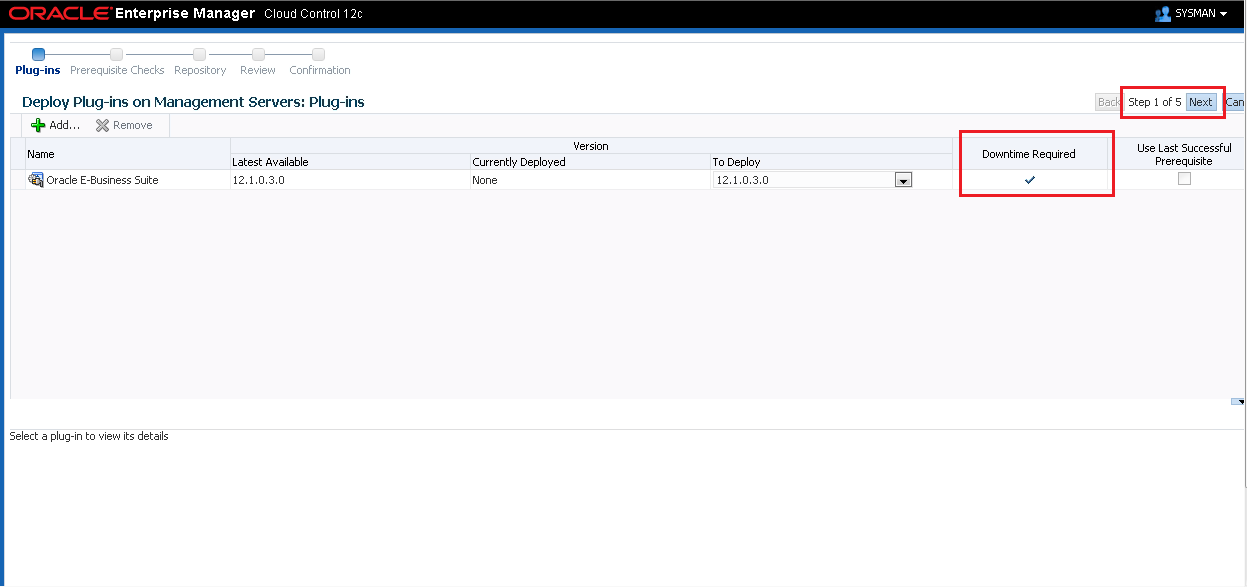


After this U need to monitor progress using command : emctl status oms -details:
Once everything is back up & running, U can log out and login to OEM console to have deployed Oracle E-Business Suite plug-in 🙂


Hope so u will find this post very useful 🙂
Cheers
Regards,
Adityanath


 Adityanath's Database & Cloud Blog
Leave a reply to Beauty Fashion Cancel reply