Dear Readers,

Recently one of BU person in my project requested us to send scheduled report for RMAN Backup completion for one of critical databases. As this requirement was from Business, I thought of having it simple & less techie. After exploring few options, I thought of using OEM reporting functionalities & found its really amazing.

This post will guide you on how to create custom information publisher report.

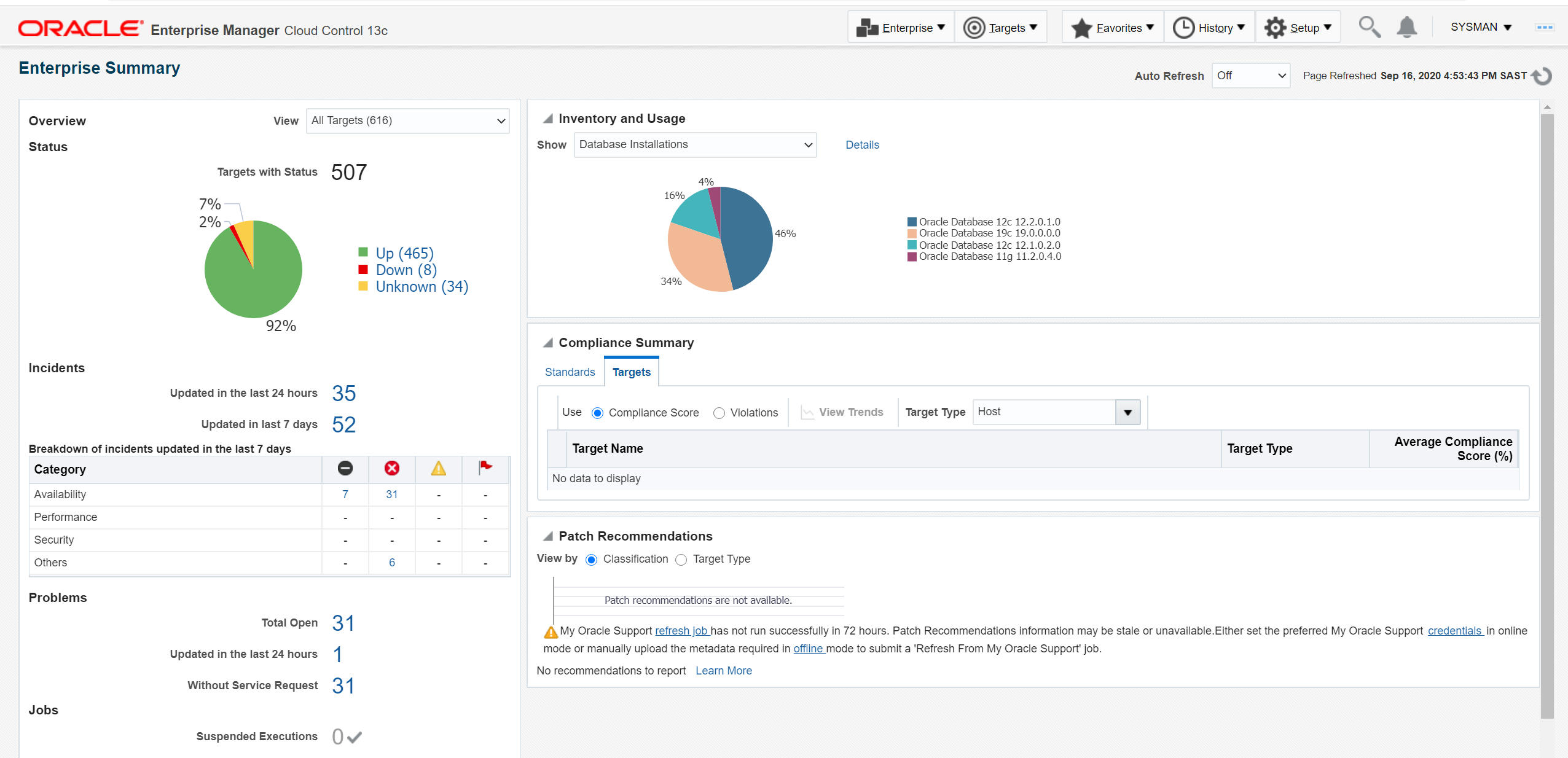
1. Login to OEM. This is how my home page looks:
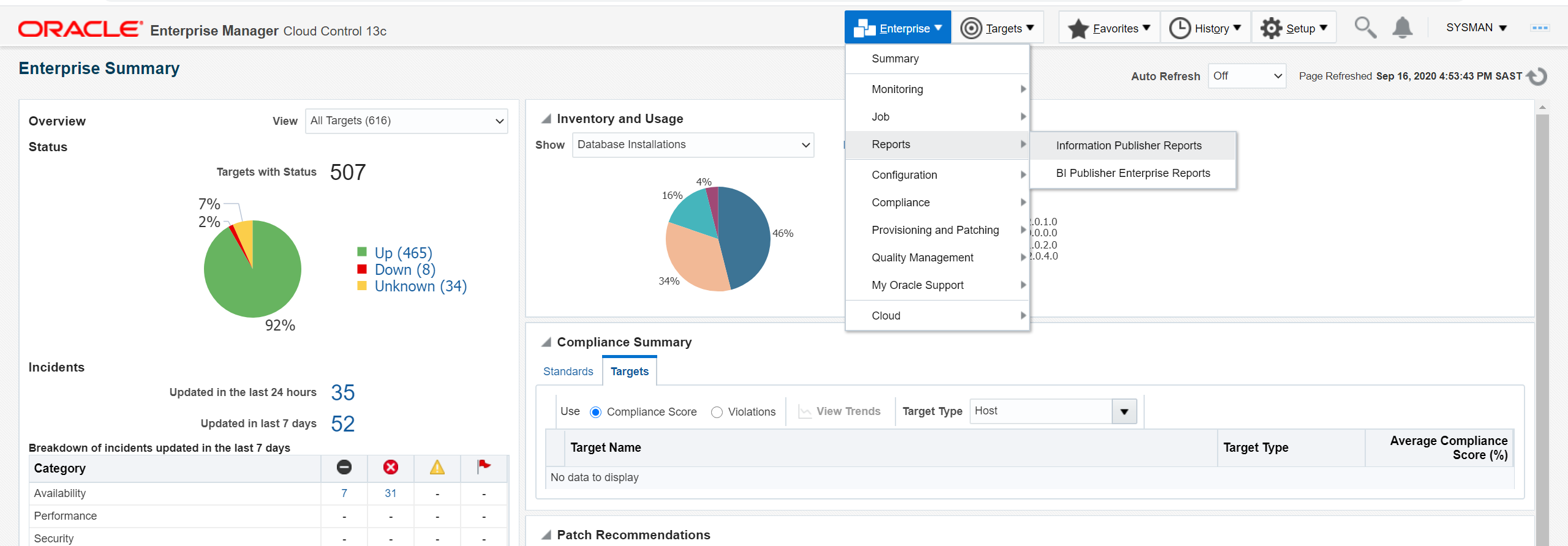
2. Click on Enterprise ==> Reports ==> Information Publisher Reports
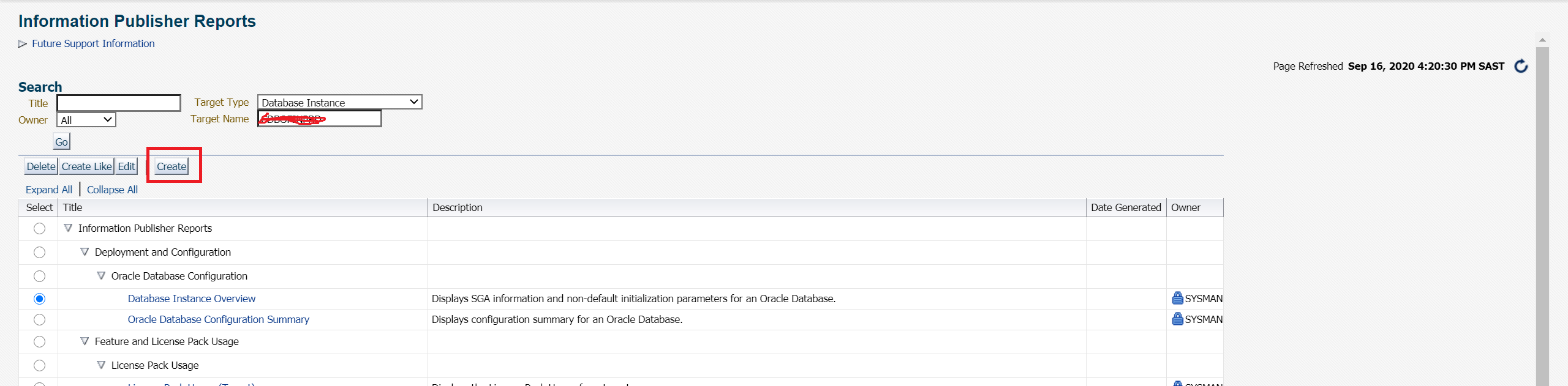
3. This is landing page for Information Publisher Reports. Click on “Create”.
4. Report creation basically has 4 steps: General, Elements, Schedule, Access.

5. Fill the details under “General” tab as per your requirement. Check the box “Run report using target privileges of report owner (SYSMAN)”

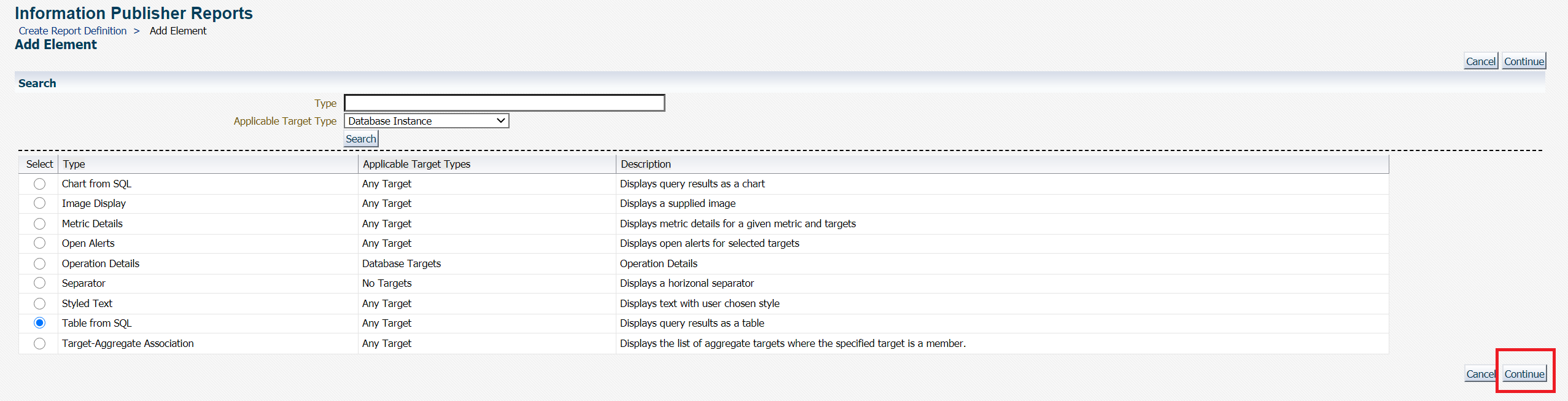
6. Click on “Elements” tab, click on “Add”:

7. As I need to run a query against repository database, I will select “Table from SQL” & click on “continue”.
8. Click on “Set parameters” icon & configure your custom query as per your need. In my case, I am using the below & then click “Continue”

SELECT start_time as "Start",
end_time as "End",
output_bytes / 1024 / 1024 / 1024 as "Size in GB",
elapsed_Seconds / 60 as "Time taken in Minutes",
input_type as "Type",
output_device_type as "Device",
status as "Status"
FROM sysman.DB_BACKUP_HISTORY_E
WHERE target_GUID = '<GUID of your database>' -- you may need to query SYSMAN.EM_ALL_TARGETS to get these details.
and start_time>sysdate-1
ORDER BY start_time;

9. Click on “Preview” to see if you are getting desired results. If yes, click on “Return to Create Report Definition”.


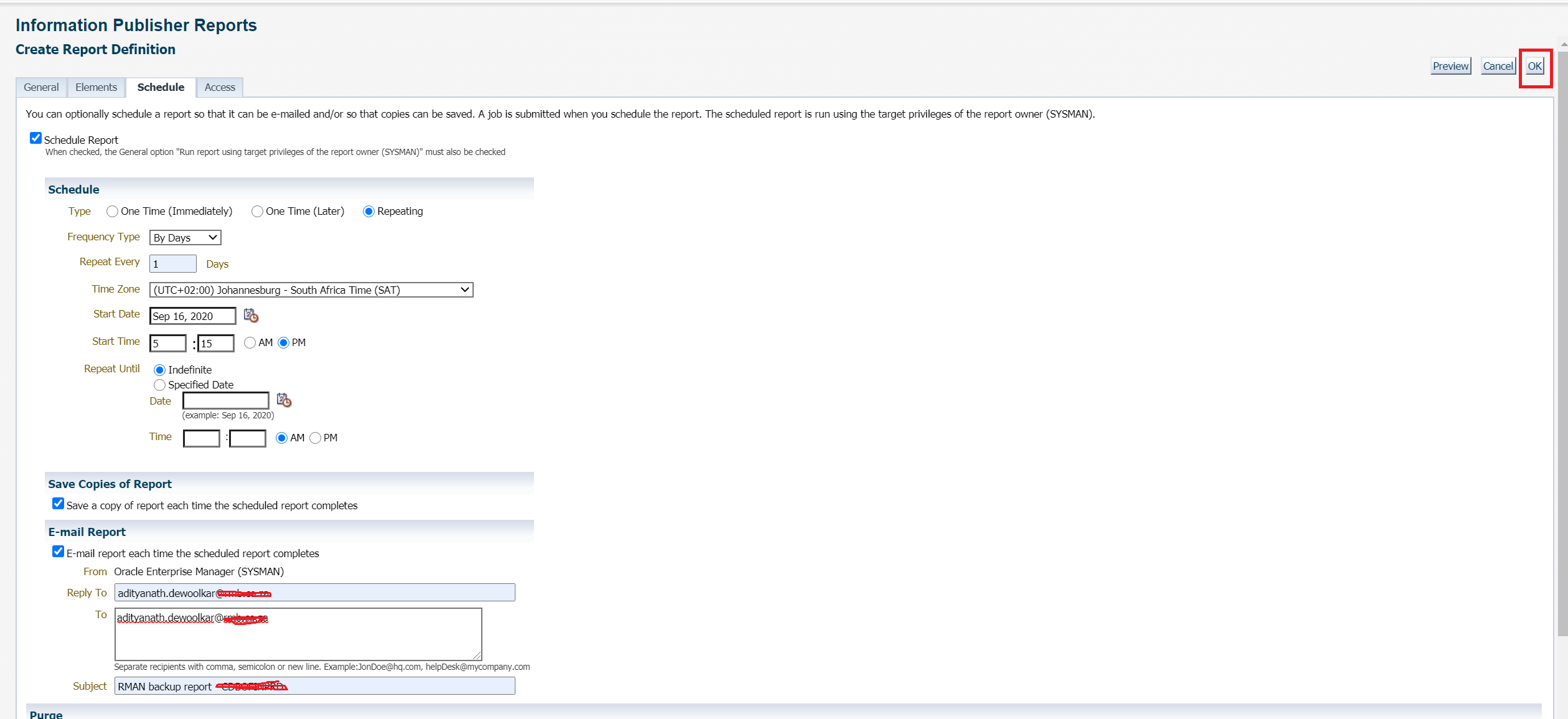
10. Click on “Schedule” tab & setup schedule as per your need. Once done click “OK”.
11. Your report is now ready.

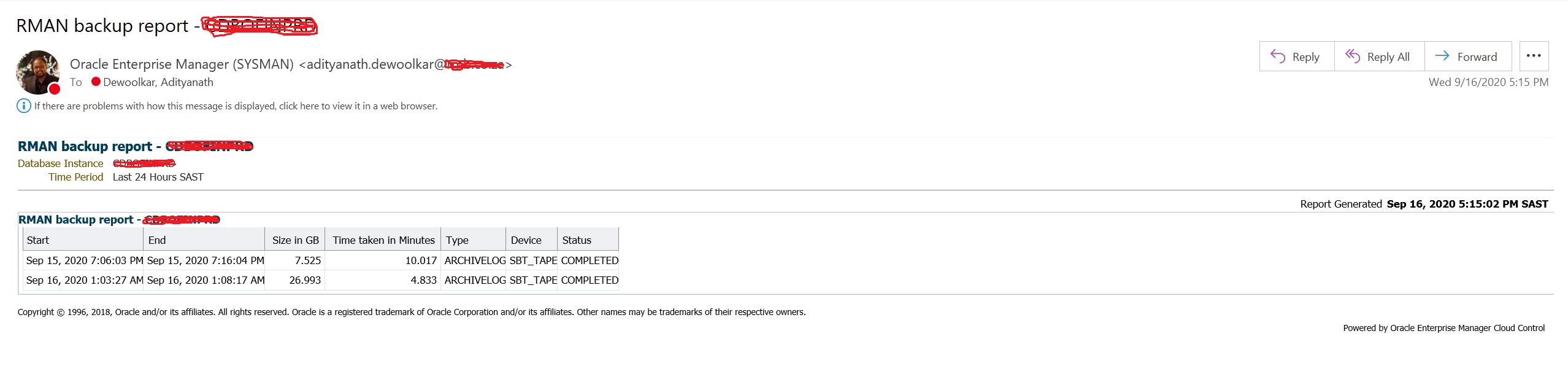
12. Check for simple yet powerful report in your inbox 🙂
Hope u will find this post very useful.

Cheers

Regards,
Adityanath

Advertisements

26 responses to “Using Information Publisher Reports in Oracle Enterprise Manager for RMAN backup reporting.”

  1. Anup Avatar
    Anup

    There is no elapsed_Seconds column in this table DB_BACKUP_HISTORY_E.
    Instead its ‘TIME_TAKEN_DISPLAY’

    1. Adityanath Dewoolkar Avatar

      Hello,

      Its there in my database. My repository database is on 12.2:

      Regards,
      Adi

  2. Autumn is on its way – Oracle Business Intelligence Avatar

    […] 1. Using Information Publisher Reports in Oracle Enterprise Manager for RMAN backup reporting. […]

  3. Theo Wener Avatar
    Theo Wener

    thank you for sharing with us, I think this website really stands out : D.

  4. Abram Scarcia Avatar
    Abram Scarcia

    You have made some really good points there. I checked on the net for more info about the issue and found most people will go along with your views on this web site.

  5. Shona Hirtz Avatar
    Shona Hirtz

    I always was interested in this subject and still am, thanks for putting up.

  6. Anand Avatar
    Anand

    Hi,
    I’m getting the below error. Is it checking as sysman user?

    I don’t have sysman in my database.

    Error rendering element. Exception: ORA-00942: table or view does not exist

    1. Adityanath Dewoolkar Avatar

      Hello,

      Can you please provide below output from OMS repository database:

      desc sysman.DB_BACKUP_HISTORY_E

      select object_name, OWNER,object_type,status
      from dba_objects
      where object_NAME = ‘DB_BACKUP_HISTORY_E’;

      Also provide version of repository database.

      Regards,
      Adi

  7. Anand Avatar
    Anand

    Hi Adi,

    Please find the details below.

    OBJECT_NAME OWNER OBJECT_TYPE STATUS
    ——————– ————— ——————– ——-
    DB_BACKUP_HISTORY_E SYSMAN TABLE PARTITION VALID
    DB_BACKUP_HISTORY_E SYSMAN TABLE PARTITION VALID
    DB_BACKUP_HISTORY_E SYSMAN TABLE PARTITION VALID
    DB_BACKUP_HISTORY_E SYSMAN TABLE PARTITION VALID
    DB_BACKUP_HISTORY_E SYSMAN TABLE PARTITION VALID
    DB_BACKUP_HISTORY_E SYSMAN TABLE PARTITION VALID
    DB_BACKUP_HISTORY_E SYSMAN TABLE PARTITION VALID
    DB_BACKUP_HISTORY_E SYSMAN TABLE PARTITION VALID
    DB_BACKUP_HISTORY_E SYSMAN TABLE PARTITION VALID
    DB_BACKUP_HISTORY_E SYSMAN TABLE PARTITION VALID
    DB_BACKUP_HISTORY_E SYSMAN TABLE PARTITION VALID
    DB_BACKUP_HISTORY_E SYSMAN TABLE PARTITION VALID
    DB_BACKUP_HISTORY_E SYSMAN TABLE PARTITION VALID
    DB_BACKUP_HISTORY_E SYSMAN TABLE PARTITION VALID
    DB_BACKUP_HISTORY_E SYSMAN TABLE PARTITION VALID
    DB_BACKUP_HISTORY_E SYSMAN TABLE PARTITION VALID
    DB_BACKUP_HISTORY_E SYSMAN TABLE PARTITION VALID
    DB_BACKUP_HISTORY_E SYSMAN TABLE PARTITION VALID
    DB_BACKUP_HISTORY_E SYSMAN TABLE PARTITION VALID
    DB_BACKUP_HISTORY_E SYSMAN TABLE PARTITION VALID
    DB_BACKUP_HISTORY_E SYSMAN TABLE PARTITION VALID
    DB_BACKUP_HISTORY_E SYSMAN TABLE PARTITION VALID
    DB_BACKUP_HISTORY_E SYSMAN TABLE PARTITION VALID
    DB_BACKUP_HISTORY_E SYSMAN TABLE PARTITION VALID
    DB_BACKUP_HISTORY_E SYSMAN TABLE PARTITION VALID
    DB_BACKUP_HISTORY_E SYSMAN TABLE PARTITION VALID
    DB_BACKUP_HISTORY_E SYSMAN TABLE PARTITION VALID
    DB_BACKUP_HISTORY_E SYSMAN TABLE PARTITION VALID
    DB_BACKUP_HISTORY_E SYSMAN TABLE PARTITION VALID
    DB_BACKUP_HISTORY_E SYSMAN TABLE PARTITION VALID
    DB_BACKUP_HISTORY_E SYSMAN TABLE PARTITION VALID
    DB_BACKUP_HISTORY_E SYSMAN TABLE PARTITION VALID
    DB_BACKUP_HISTORY_E SYSMAN TABLE PARTITION VALID
    DB_BACKUP_HISTORY_E SYSMAN TABLE PARTITION VALID
    DB_BACKUP_HISTORY_E SYSMAN TABLE PARTITION VALID
    DB_BACKUP_HISTORY_E SYSMAN TABLE VALID

    36 rows selected.

    SQL> desc sysman.DB_BACKUP_HISTORY_E
    Name Null? Type
    —————————————– ——– —————————-
    TARGET_GUID NOT NULL RAW(16)
    COLLECTION_TIMESTAMP DATE
    SESSION_KEY NOT NULL NUMBER
    SESSION_RECID NOT NULL NUMBER
    SESSION_STAMP NOT NULL NUMBER
    NAME VARCHAR2(33)
    STATUS VARCHAR2(23)
    INPUT_TYPE VARCHAR2(13)
    OUTPUT_DEVICE_TYPE VARCHAR2(17)
    START_TIME DATE
    END_TIME DATE
    TIME_TAKEN_DISPLAY VARCHAR2(72)
    INPUT_BYTES NUMBER
    OUTPUT_BYTES NUMBER
    MEDIA VARCHAR2(65)
    KEEP_UNTIL DATE
    KEEP VARCHAR2(3)
    KEEP_OPTIONS VARCHAR2(11)
    COMPRESSION_RATIO NUMBER
    INCREMENTAL_LEVEL NUMBER
    ELAPSED_SECONDS NUMBER
    TAG NOT NULL VARCHAR2(32)
    CONTAINER VARCHAR2(600)
    COMPRESSED VARCHAR2(3)
    ENCRYPTED VARCHAR2(3)
    INPUT_BYTES_DISPLAY VARCHAR2(4000)
    OUTPUT_BYTES_DISPLAY VARCHAR2(4000)
    OUTPUT_BYTES_PER_SEC NUMBER
    OUTPUT_BYTES_PER_SEC_DISPLAY VARCHAR2(4000)
    CON_ID NUMBER

    SQL> select count(*) from sysman.DB_BACKUP_HISTORY_E;

    COUNT(*)
    ———-
    0

    1. Anand Avatar
      Anand

      Repository Database version – 12.2.0.1.0 – 64bit

  8.  Avatar
    Anonymous

    Useful information. Fortunate me I discovered your website by accident, and I’m stunned why this accident didn’t happened in advance! I bookmarked it.

  9.  Avatar
    Anonymous

    Wow! This can be one particular of the most helpful blogs We’ve ever arrive across on this subject. Basically Wonderful. I’m also a specialist in this topic so I can understand your hard work.

  10.  Avatar
    Anonymous

    Hello there, I discovered your website by the use of Google at the same time as looking for a comparable topic, your site came up, it looks great. I’ve bookmarked it in my google bookmarks.

  11.  Avatar
    Anonymous

    Incredible! This blog looks just like my old one! It’s on a entirely different topic but it has pretty much the same page layout and design. Wonderful choice of colors!

  12.  Avatar
    Anonymous

    Great work! This is the type of info that should be shared around the web. Shame on Google for not positioning this post higher! Come on over and visit my site . Thanks =)

  13. Barrett Farese Avatar
    Barrett Farese

    I couldn’t resist commenting. Perfectly written!

  14. Arlen Avatar
    Arlen

    Please let me know if you’re looking for a article writer for
    your blog. You have some really great articles and I feel I would be a good asset.
    If you ever want to take some of the load off, I’d absolutely love to write some
    material for your blog in exchange for a link back to
    mine. Please send me an email if interested. Many thanks!

  15. Burt Weier Avatar
    Burt Weier

    You should take part in a contest for one of the highest quality sites on the internet. I will recommend this web site!

  16. Tracie Avatar
    Tracie

    I’m no longer sure where you are getting your info, but great topic.
    I must spend some time studying more or working out
    more. Thank you for excellent information I used to be
    looking for this information for my mission.

  17. Elenora Furbush Avatar
    Elenora Furbush

    Amazing! This blog looks exactly like my old one! It’s on a totally different subject but it has pretty much the same layout and design. Excellent choice of colors!

  18. Fashion Styles Avatar

    Usually I do not learn post on blogs, however I wish to say that this write-up very pressured me to check out and do so! Your writing style has been amazed me. Thanks, quite great post.

  19. Hairstyles Avatar

    whoah this weblog is magnificent i love reading your articles. Keep up the good work! You know, a lot of individuals are searching round for this information, you can help them greatly.

  20. Fashion Styles Avatar

    I love what you guys are usually up too. This type of clever work and reporting! Keep up the terrific works guys I’ve included you guys to my blogroll.

  21. Hairstyles Avatar

    Hey there, You have done a fantastic job. I will definitely digg it and personally recommend to my friends. I’m confident they’ll be benefited from this web site.

  22. Salim Avatar
    Salim

    Good morning, Does the target database have to be in Enterprise Edition? Or is the standard version allowed? THANKS

    1. Adityanath Dewoolkar Avatar

      The EM repository database requires an Enterprise Edition database.

      If you are adding a SE (Standard Edition) database as a target in an existing OEM, it’s simply installing the agent on the database server, running target discovery and addind the DB as a target.
      From EM standpoint, there is no destinguish between SE or EE database as a target, the db target will be discovered and added to EM.

      However, monitoring an SE database using OEM can violate licensing terms, for example if someone uses the performance page in OEM, then licensing terms may be violated as this is part
      of the ‘Tuning & Diagnostic pack’ which is an EE option.

      Kindly refere “EM 13c: Is it certified To Monitor SE or SE2 (Standard Edition) Oracle database / Use As Repository in OEM? (Doc ID 2645712.1)”

Leave a reply to Anand Cancel reply

Advertisements
Blog Stats

560,795 hits

Advertisements
Advertisements